The real app, running right here in your browser on sample data. Open the Assistant,
tell it what you want to focus on, and watch it work. There's nothing to install, and nothing you do here leaves this page.
reddit.com×
Docs · the work
+
‹›⟳
reddit.com☆
3⋮
Attentify is reading this page…
FeedSearchWatch
☰redditr/technology✕Search in r/technologyLog In···
r/technology+ Create PostJoin
Best ⌄▤ ⌄
u/marketrent· 19 days ago···
High school teacher arrested for clapping in support of anti-data-centre activists
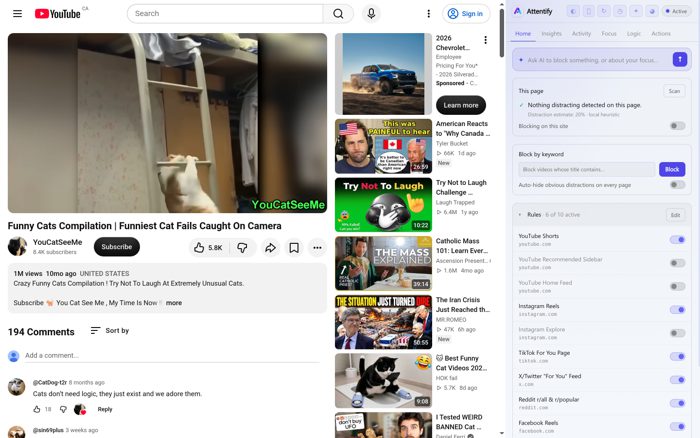
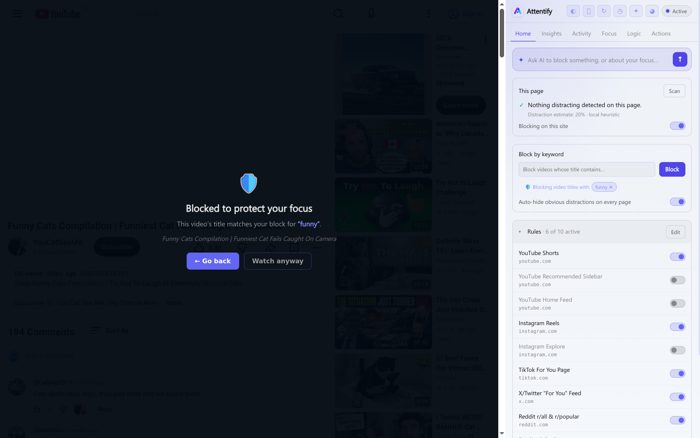
Funny Cats Compilation | Funniest Cat Fails Caught On Camera1M views · 10 months agoYouCatSeeMeCrazy Funny Cats Compilation! Try Not To Laugh At Extremely Unusual Cats.
4:02
Cats absolutely losing it over a cucumber840K views · 1 month agoDailyDoodlesThe reaction that started a thousand copycat videos, in one cut.
People also watched
12:44
Try not to laugh challenge - impossible editionLaugh Trapped · 6.4M views
50:55
The situation just reached the point of no returnMR.ROMEO · 47K views · 6 hours ago
☰YouTubeCASearch⋮Sign in
YouCatSeeMe
Funny Cats Compilation | Funniest Cat Fails Caught On Camera
YouCatSeeMe8.4K subscribersSubscribe5.8KShareSave
1M views · 10 months ago · UNITED STATESCrazy Funny Cats Compilation! Try Not To Laugh At Extremely Unusual Cats. Subscribe to You Cat See Me. more
194 Comments Sort by
@CatDog-t2r8 months ago
Cats don't need logic, they just exist and we adore them.
@sin69plus3 weeks ago
The one at 4:12 genuinely made me wake the whole house up.
2026 Chevrolet SilveradoEmployee Pricing For You*Sponsored · ChevroletLearn more
Up next Autoplay
26:59
American Reacts to "Why Canada is different"Tyler Bucket66K views · 1 day ago
10:22
Try Not To Laugh ChallengeLaugh Trapped6.4M views · 1 year ago
39:14
Catholic Mass 101: Learn EverythingAscension Presents1.6M views · 4 months ago
9:08
Best Funny Cat Videos 2026HOK fail5.7K views · 8 days ago
On the left, real pages rebuilt live in this browser: the feed loads cluttered, then Attentify
strips the promoted posts, the Shorts shelf and the recommendation rail, naming every call as it makes it.
On the right is the actual extension, running live. Straight-from-the-browser captures are further down.
No setup hassle · your history stays on your device · open source, minus the AI · macOS and mobile soon
Why it actually works
It reads the intent, not just the address.
postgres index performance
Openson your goal
funniest fails of 2026
Blockedbefore it loads
It stops the page before it loads.
The AI reads where a click is heading and weighs it against the goal you set, so a distraction
is gone before it ever renders. That's why one search opens and the next one doesn't:
it judges the intent behind the query, not the domain against a list. The same read runs
on a link before you click it, so the bait never gets its shot.
you kept lo-fi playlists
Shorts slipped through once
reddit.com changed its feed
tuned to you
It gets sharper the longer you use it.
Every block you keep and every one you undo teaches it where your line sits, and that carries
across sites. The things that slipped past it stop slipping. Updates ship continuously, so
when a site rewrites its feed the blocking heals instead of quietly breaking.
Stays on your devicefull historypage contentskeystrokes
only this leaves
domain + pathpage titlesearch termsyour goals
Your browsing stays on your machine.
The detailed record sits in a local database we never receive. To judge one page the AI is given
four things and nothing else. No full history, no page contents, no keystrokes, nothing sold and
no ad trackers. Switch the AI off and blocking still works with nothing leaving at all.
The extension cleans your browser. The app runs the whole show.Beta
Add the Windows app and everything levels up. It's a chat-first focus engine for your
whole computer, and the browser just plugs right into it. The desktop app is in beta:
it works, and it is still rough in places. The extension is the stable one.
A real assistant, not just toggles. Chat with it in plain English across saved conversations, attach a screenshot, and revert to any earlier point with one click if it goes too far.
It shows its work. A Logic page lays out, as collapsible flow-charts, exactly why it thinks you're distracted, and you can feed it your own context to sharpen it.
Analytics you just describe. Ask for "time on social by weekday" and it builds a live chart, table or graph. Plus RescueTime-style timesheets and auto-built schedules.
Cleans up your machine. Deep Clean finds attention leaks and can stop apps launching at startup. It even imports your browser history so analytics work from day one.
Works with your browser, whatever it is. Tracks the top 15 browsers natively (Chrome, Edge, Firefox, Brave, Arc, Opera, Vivaldi and more), with no extension required. Light & dark themes.
Block YouTube Shorts but keep my subscriptions and tutorials.
attentifyDone. I set up a rule so the Shorts shelf, the player and /shorts/* are gone. Everything else on YouTube stays exactly as it is. Synced to your browser.
I keep opening music videos when I should be working.
attentifyGot it. I'll hide videos whose titles look like music videos, and I'll flag it when you start to drift. Want me to step in harder after the third slip?
Works onYouTubeInstagramTikTokX / TwitterRedditFacebookLinkedInand takes out the parts that hijack you, while keeping what you came for.
No setup required
Tell it your goal. That's the whole job.
1
Install in a click
Grab the Windows app, or just add the browser extension. They find each other on their own,
and the extension works fine all by itself.
2
Tell it what you want
Say it in plain English: "help me write until 5pm,""no more doom-scrolling,""kill Shorts but keep my subscriptions." The AI turns it into protection for you.
3
Get your head back
It runs quietly, adapts to how distracted you look, heals itself when sites change, and catches
you when you try to wriggle out. You just notice the noise is gone.
What's in it for you
Get your time, your focus and your head back.
These apps were built by hundreds of engineers to capture your attention. This is the AI that
fights on your side instead. Here's what that actually does for you.
◐
Say it once. It handles the rest.
Type something like "I'm writing all afternoon, keep me off social" and you're done.
There's nothing to configure and no blocklist to keep up. The AI sets the whole thing up for you. Zero setup on your end.
⌖
Keep the useful web, lose the bait.
It only pulls out the engineered traps like Shorts, Reels and the For-You feed, so you still
get your tutorials, your DMs and your subscriptions. You never have to give up a site you actually need.
⚇
It catches you before you spiral.
The on-device AI notices why you opened a page and how far you're drifting, then steps in
the moment you start doom-scrolling. You stop losing whole evenings you never meant to give away.
↻
Set it and actually forget it.
It fixes itself when sites change, and gets a little firmer if you keep trying to sneak around it.
A gentle nudge first, then something stronger. It won't quietly stop working on you.
⛒
Ban the stuff that hooks you, by name.
Tell it "no music videos, no rage bait, no gym influencers" in plain English and it's
gone from your feed before you ever click. Your feed finally stops knowing your weak spots.
⬡
Your history stays on your machine.
Everything you do is recorded locally and we never receive it. When the AI has to judge a
page, it sees that one page's address and title, and nothing else. No trackers, no ads,
nothing sold. You free your mind without handing over your life.
The honest comparison
What the others can't do.
Capability
Attentify
Freedom / Cold Turkey
Basic blocker extensions
Removes only the addictive parts of a site
✓ Surgical
✗ Whole-site only
~ Some elements
AI understands why you're there
✓
✗
✗
Adapts blocking to how distracted you look
✓ Real-time
✗ Fixed schedule
✗
Block individual videos by title
✓ Pre-emptive
✗
✗
Self-heals when SPA sites re-render
✓ <0.5s
n/a
✗ Often breaks
Your history stays on your device
✓
~ Varies
~ Varies
Open source client, auditable
✓
✗
~
Price
Free
$3 to $10/mo
Free to paid
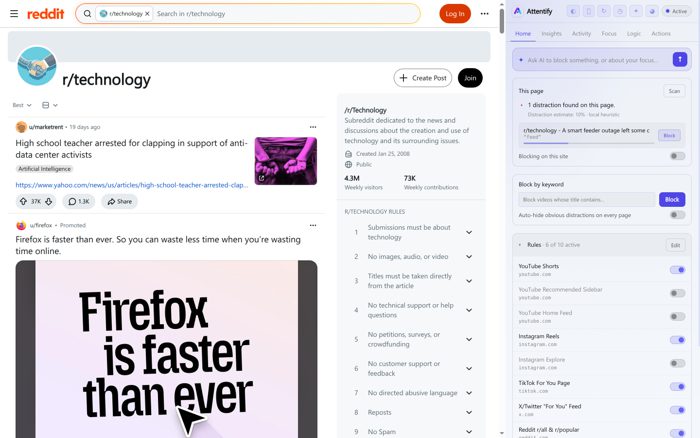
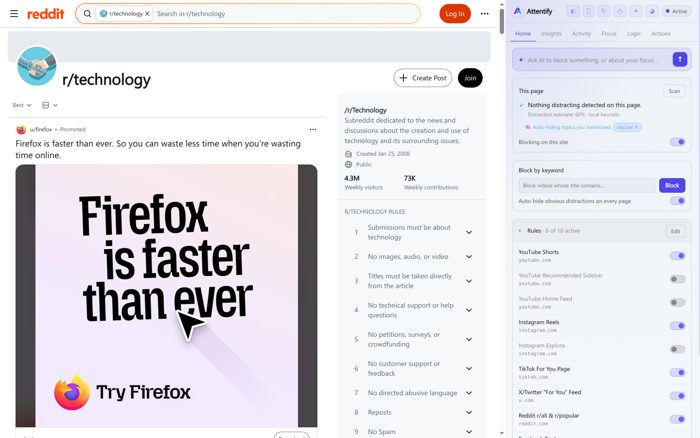
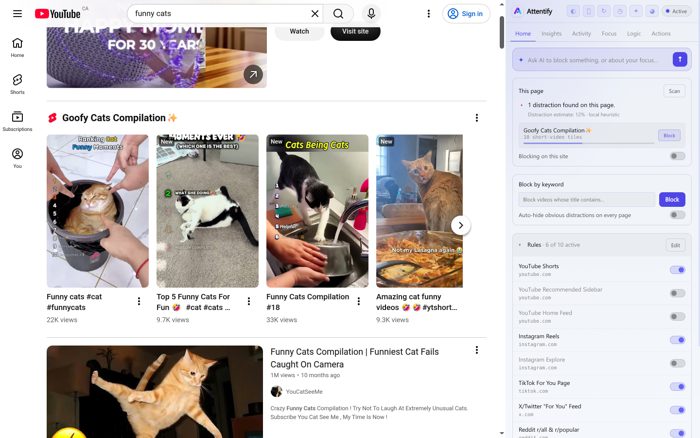
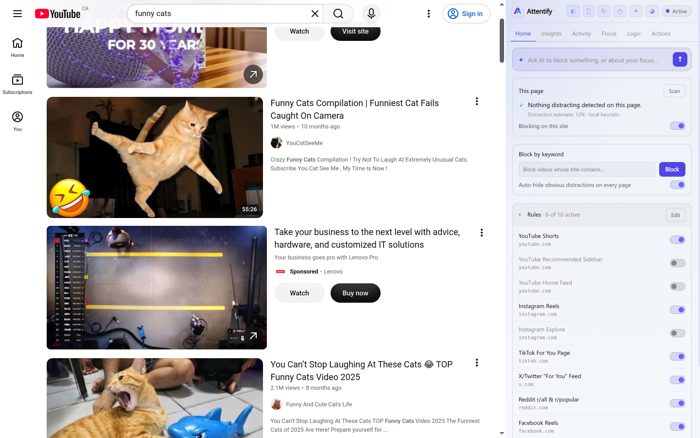
Real pages, same browser, one reload.
Each pair is the same site captured twice - once as it loads, once the moment Attentify strips the bait. Nothing here is a mockup.
Without Attentify
With Attentify
Without Attentify
With Attentify
Without Attentify
With Attentify
Pricing
Blocking is free. Pay only for the AI.
The app and extension are free. Every account starts with free AI credit. When it runs low,
top up as you go, or go unlimited for $9.99/mo. What you are paying for is a service that keeps
getting better: the classifier is retrained on real mistakes, new sites and new dark patterns are
handled as they appear, and the app updates itself.
The Windows app is in beta. It works, and it is still rough in places. The extension is the stable one, so start there.
On the Chrome Web Store now, for Chrome, Edge, Brave, Arc, Opera and Vivaldi. Prefer to install it yourself? Download the zip. macOS and mobile apps coming soon.
Updating
You almost never have to update this yourself.
Which of these you need depends on how you installed it, and the extension tells you
which one you are on when it sees a new version.
Installed from the Chrome Web Store? Do nothing.
Chrome checks for new versions by itself and installs them quietly, usually within a
few hours of a release. There is no zip to download and nothing to replace. If you
want to force the check right now, open chrome://extensions, turn on
Developer mode, and press Update.
Installed it yourself from the zip?
Chrome cannot update an extension you loaded yourself, so this one is manual. Download
the new zip, unzip it over the folder you already have, then open
chrome://extensions and press Reload on the Attentify card. Your rules,
settings and history are stored in the browser profile, so they survive the swap.
How do I know which version I have?
Open the extension and look at the version in the popup, or open
chrome://extensions where every extension lists its version. The popup only
raises the update banner when there is actually something new for your install.
Your agent has no idea what you actually did today.
It can read your code and your files, but not the forty minutes you lost before you opened
them. Attentify gives it that missing half, and the means to do something about it.
Add it in one lineclaude mcp add attentify -- npx -y @attentify/mcp
Works with any MCP client. Needs the Windows app running. Free, and no
account required to use the connector.
Publishing to npm shortly. Until it lands you can run it straight from the
source.
Then ask it things like
"What have I actually been working on for the last three hours?"
"Am I drifting off what I said I'd do today?"
"Block whatever has been eating my afternoon."
◷
Real behaviour, not self-report
People are unreliable narrators about their own attention. Your agent reads what actually
happened, alongside the goals you set, so its advice is about your day rather than about
websites in general.
⛨
It stays on your machine
The connector talks to the app over 127.0.0.1, gated by a per-install token.
It makes no network calls of its own. Zero dependencies, one file, about 250 lines you can
read in a sitting.
✦
It can act, not just observe
Reading is the easy half. Your agent can also block a site outright, across every browser,
when you ask it to.
Open source, AGPL, same as the rest of Attentify.
Read the source
FAQ
Is it really free?
The app and extension are free, and all the blocking works without paying anything. The AI features run on credits: every account starts with free credit, and you can top up as you go or subscribe for $9.99/mo for unlimited AI plus more custom analytics. A subscription also pays for the part that never finishes: sites change their layouts constantly, and keeping detection working is ongoing work, not a one-time build.
Do you see my browsing or send my data anywhere?
Your activity history stays on your device. It is stored in a local database that we never receive, and the blocking and on-device heuristics run without contacting us at all. When an AI feature runs, that one page's address and title, your search text and your stated goals are sent to our backend and on to the model provider, because that is what the model has to read to make a call. Nothing else leaves the machine, and there are no trackers on this page. The privacy policy spells out exactly what is sent.
How is this different from Freedom or Cold Turkey?
Those block whole sites or apps on a schedule. Attentify takes out only the addictive parts, like the Shorts shelf and the For-You feed, so you keep the useful web. And it adapts in real time to whether you're actually focused.
Do I need the desktop app?
No. The browser extension works completely on its own. The Windows app adds system-wide nudges and an assistant that writes the rules for you, and the two sync automatically when both are running.
Which browsers and sites are supported?
The Windows app sees every browser you use. It recognises 30 of them by name (Chrome, Edge, Firefox, Brave, Opera, Opera GX, Vivaldi, Arc, Tor, Chromium, Yandex, LibreWolf, Waterfox and more) and tracks your time in each with no extension needed. It reads the full page address in Chrome, Edge, Firefox, Brave and Vivaldi, and can import your existing history from the Chrome and Firefox families so your analytics work from day one. The surgical element-blocking extension is Chromium-only (Chrome, Edge, Brave, Arc, Opera, Vivaldi); it does not run on Firefox or Safari. Built-in rules cover YouTube, Instagram, TikTok, X, Reddit, Facebook and LinkedIn, and you can add any site just by asking in plain English.
Won't I just turn it off?
That's exactly why it isn't all-or-nothing. Because it removes the junk and not the tools you need, there's far less reason to switch it off. And if you do start sneaking around it, Attentify notices and gently steps in.
How do I update it?
If you got it from the Chrome Web Store, you don't: Chrome updates it on its own, usually within a few hours of a release. If you installed the zip yourself, Chrome can't touch it, so it's a manual swap. Both cases, with the exact steps, are under Updating.

Cats don't need logic, they just exist and we adore them.
The one at 4:12 genuinely made me wake the whole house up.